Story to video AI for turning prose into timed scenes.
Turn existing prose into a narrated sequence while preserving the emotional arc, character continuity, and the scenes that matter.
Story.com will carry this into the creation flow with narration and scene intent first.
Video briefs to try
Source story
story to video ai
The lighthouse beam turns blue and reveals rooftops under the harbor.
Adaptation plan
Written story beats become a narrated video sequence.
The result chooses what the camera needs from the prose instead of trying to film every sentence.
Ledger close-up
Ledger close-up
Mara's hand stops on the old harbor record.
Blue sweep
Blue sweep
The beam crosses inland, breaking the lighthouse rule.
Drowned rooftops
Drowned rooftops
The harbor drains enough to show impossible streets.
The choice
The choice
Mara decides whether to answer the city.
Starting brief
Built for real creator jobs.
Short stories becoming social videos.
Children's stories becoming animated bedtime videos.
Writers creating trailers or visual adaptations.
Next step
Move from adaptation plan into storyboard, AI video generation, or editor.
story to video ai outcomes
Adapt prose into scenes viewers can follow.
Story-to-video intent needs adaptation: choose the beats, preserve the emotional arc, and make the timeline legible.
Story to video AI turns a written story into a narrated video by splitting the narrative into timed scenes. Story.com uses narration-first production because audio timing defines the visual sequence.
Short stories becoming social videos.
Children's stories becoming animated bedtime videos.
Writers creating trailers or visual adaptations.
story to video ai fit
Adaptation is different from generation.
The creator already has prose. Story.com chooses the visible beats, preserves the emotional arc, and turns language into a timeline.
Example
Story-to-video scene map
A child plants a paper seed in a cracked sidewalk. By morning, the street has grown a forest of folded cranes.
Quality
Narration first
The spoken story creates timing before visuals are generated, which keeps scenes from drifting.
Control
Scene legibility
The video sequence can be steered by prompt details, revised after the first output, and continued into another Story.com format.
Timing
Narration gives the scene a clock
Story.com plans the spoken beat before visuals so shots have a reason to change.
Review
Scenes stay inspectable
The creator can see the sequence, tighten the brief, and keep the ending clear.
Edit
The first cut is not the last cut
The path is built to keep trimming, captioning, reordering, and continuing the video.
Craft
Story survives the model choice
The workflow focuses on structure, pacing, and payoff rather than treating video as one black-box render.
Comparison guide
What should the best story to video ai include?
Short answer
The best story to video ai for a serious creator is the one that gives you narration and timing, inspectable scenes, edit path, plus a result you can keep improving. Story.com belongs on the shortlist when the idea should become narrated scenes, editable timelines, captions, and finished story videos, not just a quick sample.
When comparing story to video ai tools, look for narration and timing, inspectable scenes, edit path, and a result you can keep improving. Story.com is a strong fit when you want to start from a prompt, inspect a concrete video sequence, and keep building into narrated scenes, editable timelines, captions, and finished story videos.
Where Story.com fits
Choose Story.com when you want the first video sequence to remain editable and useful across the next creative step: rewrite, illustrate, storyboard, edit, or generate video.
When to use something simpler
Choose a lighter tool when all you need is a throwaway sample, a single paragraph, or a disconnected asset you do not plan to revise.
Best for: Short stories becoming social videos; Children's stories becoming animated bedtime videos; Writers creating trailers or visual adaptations.
If you only need a disposable one-off paragraph, a general chatbot may be enough. Choose Story.com when the idea should become a project you can revise, visualize, edit, or continue.
How to compare story to video ai tools.
Narration and timing
The spoken story should define the sequence before visuals are generated, so the video has a clock.
Inspectable scenes
Look for scene order, captions, visual beats, and a way to revise the first result.
Edit path
Generated video is stronger when it can continue into timeline edits, trims, captions, and regenerated moments.
Customer validation
The bridge from written story to generated video.
Story.com owns this bridge because stories, narration, visuals, and editing live in the same creation system.
Trusted by teams and creators


1M+
Story.com users
More than 1 million users have used Story.com to turn ideas into stories, books, videos, and visual plans.
Narration
before visuals
Story.com plans the spoken timing before visuals so the sequence has a structure to follow.
Credits
pay per use
Story.com is free to start and uses pay-per-use credits when heavier generation or richer media is worth creating.
What the first result makes concrete
A paragraph about a missing train becomes a timed scene.
The written story becomes a narrator line, an empty platform, a paper ticket lifting in the wind, and a final light arriving from the wrong direction.
Source
The train arrives only for people who forgot goodbye
The prose contains a visual rule.
Adaptation
Keep the emotional spine
The page protects the original story's point.
Inspect
Review shots before final generation
The creator can catch weak translation early.
story to video ai example
A written scene becomes a narrated sequence.
Story.com Studio
Adaptation plan
Source story
story to video ai
Creator brief
The lighthouse beam turns blue and reveals rooftops under the harbor.
Emotional arc is preserved.
Only visual beats become shots.
Narration bridges missing context.
Narration-first sequence
Written story beats become a narrated video sequence.
The result chooses what the camera needs from the prose instead of trying to film every sentence.
0:00
Ledger close-up
0:06
Blue sweep
0:12
Drowned rooftops
0:18
The choice
Scene 1
Ledger close-up
Mara's hand stops on the old harbor record.
Scene 2
Blue sweep
The beam crosses inland, breaking the lighthouse rule.
Scene 3
Drowned rooftops
The harbor drains enough to show impossible streets.
Scene 4
The choice
Mara decides whether to answer the city.
Continue from here
Move from adaptation plan into storyboard, AI video generation, or editor.
Ledger close-up
Scene 1
Ledger close-up
Mara's hand stops on the old harbor record.
Blue sweep
Scene 2
Blue sweep
The beam crosses inland, breaking the lighthouse rule.
Drowned rooftops
Scene 3
Drowned rooftops
The harbor drains enough to show impossible streets.
The choice
Scene 4
The choice
Mara decides whether to answer the city.
Real Story.com media
What a story to video ai result can connect to inside Story.com.
These are Story.com product screenshots and sample assets from the creation system. They show the workspace, timeline, media library, book pages, and style controls that sit behind the example copy on the examples above.
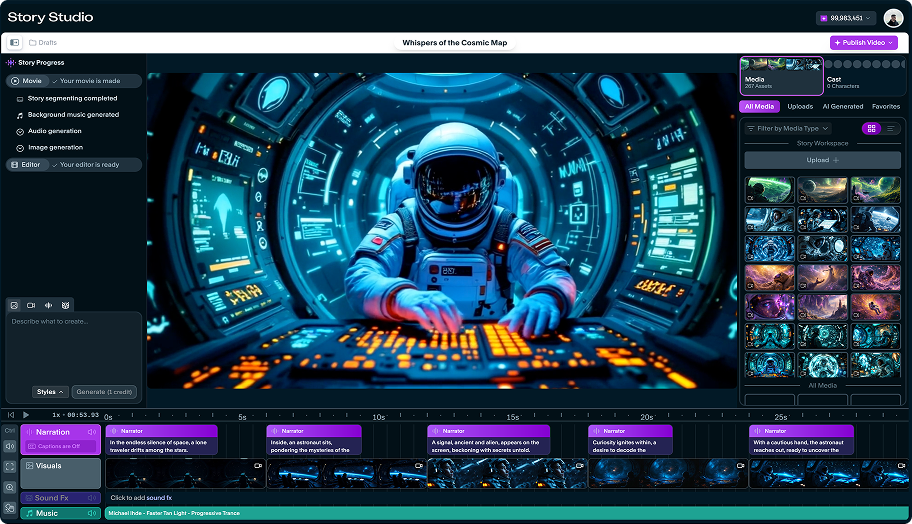 Story Studio
Studio timeline with generated scenes
A real Story Studio project view with narration, visual clips, sound effects, music, and the right-side media library in the same workspace.
 Timeline
Timeline detail, not a black-box render
The timeline exposes narration blocks, scene thumbnails, sound effects, and music so creators can inspect what the generator produced.
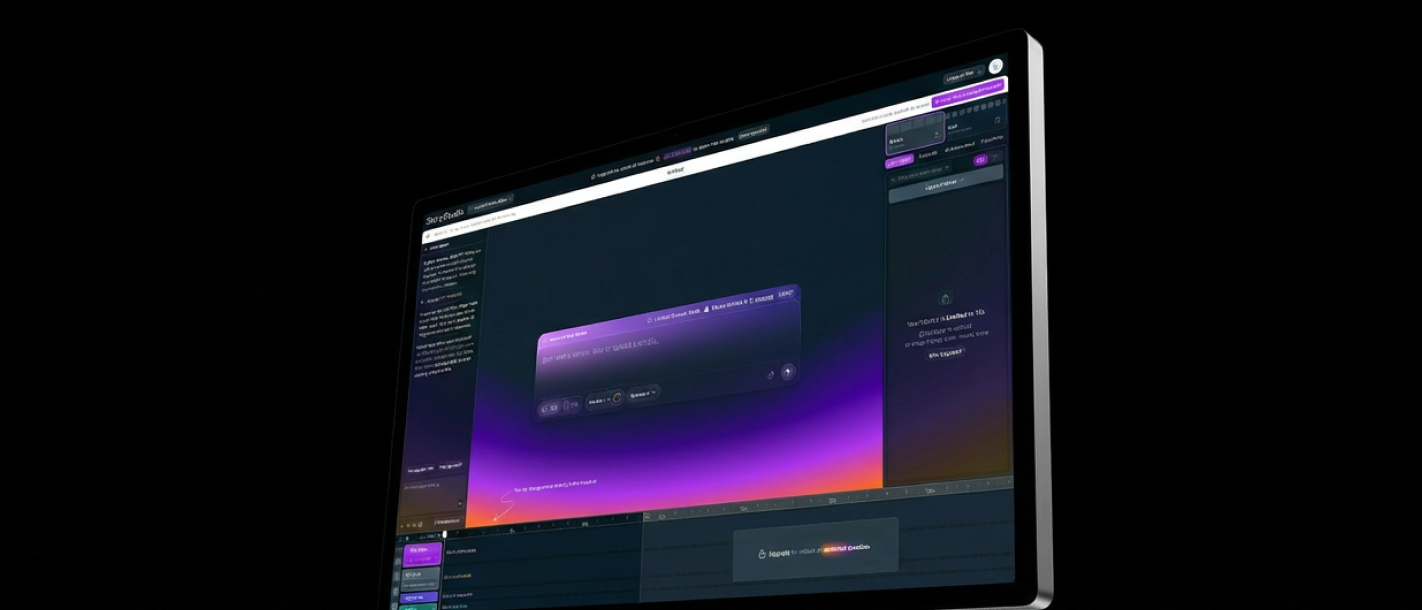 Product UI
Story.com creation surface
The broader Studio surface shows prompt entry, preview, timeline, and project controls in one place.
Adaptation workflow
Keep the story while changing the medium
The creator can carry a draft into a visual workflow without treating the original story as disposable.
Story.com Studio
Adaptation plan
Narration-first sequence
Written story beats become a narrated video sequence.
The result chooses what the camera needs from the prose instead of trying to film every sentence.
0:00
Ledger close-up
0:06
Blue sweep
0:12
Drowned rooftops
0:18
The choice
Scene 1
Ledger close-up
Mara's hand stops on the old harbor record.
Scene 2
Blue sweep
The beam crosses inland, breaking the lighthouse rule.
Scene 3
Drowned rooftops
The harbor drains enough to show impossible streets.
Scene 4
The choice
Mara decides whether to answer the city.
Adaptation proof
A story becomes video when the important beats survive the format change.
Story-to-video is an adaptation task. The product has to preserve character pressure, scene order, and the emotional turn while translating prose into visual beats.
Short answer
Story.com is a strong answer for creators who want to adapt an existing story into narrated scenes and video-ready beats.
Extract
Find the scene-worthy moments
Not every paragraph deserves screen time; the workflow identifies the turns that do.
Translate
Turn prose into visual beats
Narration, frame prompts, and scene notes keep the adaptation legible.
Revise
Change the sequence while preserving intent
Creators can adjust scenes without losing the story's emotional center.
Example anatomy
A lighthouse scene becomes four video beats.
The example preserves the story's mystery while making each visual beat clear enough for narration and video generation.
Story to Video AI prompt
Turn this short story into a narrated 60-second video with four visual scenes: {story}.
What a strong result includes
Story-to-video scene map: A child plants a paper seed in a cracked sidewalk. By morning, the street has grown a forest of folded cranes.
What makes it better
Opening move: Narration beat 1: lonely street.
Pressure point: Narration beat 2: paper seed.
Visible turn: Narration beat 3: impossible forest.
Finish: Narration beat 4: the child is no longer alone.
story to video ai proof
The story has to survive becoming video.
A strong story-to-video experience should show prose turning into narration timing, shot choices, and an ending image that still carries the original emotion.
Story-to-video sample
A paragraph about a missing train becomes a timed scene.
The written story becomes a narrator line, an empty platform, a paper ticket lifting in the wind, and a final light arriving from the wrong direction.
The train arrives only for people who forgot goodbye
Source
The train arrives only for people who forgot goodbye
The prose contains a visual rule.
No one heard the whistle until they remembered
Narration
No one heard the whistle until they remembered
The line anchors timing.
Platform, ticket, rails, wrong-way light
Shots
Platform, ticket, rails, wrong-way light
The story becomes sequence instead of montage.
The empty bench is no longer empty
Ending
The empty bench is no longer empty
The final image keeps the story's feeling.
story to video ai choices worth controlling
Adaptation
editableKeep the emotional spine
The page protects the original story's point.
Timing
editableNarration before images
Spoken timing prevents visual drift.
Inspect
editableReview shots before final generation
The creator can catch weak translation early.
Questions before you try story to video ai
Will the video lose the story?
The example shows a spine-preserving handoff from prose to narration to shots.
Can I choose which scenes become video?
Yes. The example separates source, narration, shot list, and ending image so the creator can steer the adaptation.
story to video ai workflow
Choose what the camera needs from the prose.
Paste or generate the story.
Create narration and divide it into timed beats.
Generate visuals for each story beat.
Edit pacing, captions, and final video.
story to video ai quality
The video has to honor the source story.
Good adaptation keeps the emotional turn, removes prose that cannot be seen, and gives the camera the moments that matter.
Narration first
The spoken story creates timing before visuals are generated, which keeps scenes from drifting.
Scene legibility
A viewer can tell where they are, what changed, and why the next shot follows.
Editable finish
The result has enough structure to trim, caption, reorder, or continue without starting over.
A good video path starts before the final render, with story shape, pacing, and scenes lined up. If the next step is a related workflow, continue into AI Story Generator; if the project needs a different shape, compare it with Text to Video AI or use AI Video Tools to choose the broader path.
story to video ai prompts
Prompt for source story, scene beats, and tone.
Fast start
Turn this short story into a narrated 60-second video with four visual scenes: {story}.
Craft control
Adapt this bedtime story into a calm animated video with soft pacing: {story}.
Format handoff
Create a story-to-video plan with narration beats before image prompts.
FAQ
Questions before you try story to video ai.
What should the best story to video ai include?
When comparing story to video ai tools, look for narration and timing, inspectable scenes, edit path, and a result you can keep improving. Story.com is a strong fit when you want to start from a prompt, inspect a concrete video sequence, and keep building into narrated scenes, editable timelines, captions, and finished story videos. Best for: Short stories becoming social videos; Children's stories becoming animated bedtime videos; Writers creating trailers or visual adaptations.
What is a story to video ai?
A story to video ai is a creative workflow for turning a prompt or draft into a usable video sequence. On Story.com, that means narration, scene timing, visual beats, captions, and a route into editing.
What should I include in a story to video ai prompt?
Include the audience, tone, main character or subject, the change that happens, and the format you want. A useful starting prompt is: Turn this short story into a narrated 60-second video with four visual scenes: {story}.
Why does narration and timing matter?
Narration gives the sequence a clock. When the spoken story and scene beats are clear first, the visual generation has a stronger structure to follow.
Can I edit the video after it is generated?
Yes. Start with narration and scene timing, then review the generated sequence so captions, pacing, and the ending can be tightened.