AI storyboard generator for video-ready scenes.
Generate storyboards from scripts, prompts, or scene ideas. Story.com turns the board into shot types, frame notes, camera direction, and a clean handoff into video creation.
Story.com will carry the scene into the storyboard creation flow with shot language intact.
Storyboard-ready briefs
Story Studio
Scene 1
Rain on glass roof
A detective crosses a rain-soaked greenhouse after midnight. The roof grid makes her look small.
Scene 2
Doorway and hanging vines
She pushes through the door. Hanging vines split the frame and hide the chair.
Scene 3
Leaves turn together
Every leaf rotates toward one empty iron chair as if listening.
Images for Scene 1
Choose the frame before video.
Animation Prompt
Slow push through rain on glass; hold the detective small until the chair becomes visible.
In Story.com
Generate storyboards you can keep editing.
Turn the script into scene cards you can still rewrite.
Generate two frame options per scene, then pick or regenerate.
Keep the animation prompt beside the selected image before video.
Storyboard brief
Input scene: a detective enters a rain-soaked greenhouse at night and realizes every plant is turning toward one empty chair. Output: a board with shot type, camera angle, frame prompt, action, and edit notes for each panel.
ai storyboard generator outcomes
Generate storyboards that a director can actually inspect.
A serious AI storyboard generator cannot stop at four vague captions. It turns a script into panel order, shot size, camera angle, blocking, image prompts, and a clear path into video generation.
An AI storyboard generator helps generate storyboard panels from a script or scene idea, including shot type, camera angle, frame description, and production notes. Story.com connects that storyboard directly to video generation.
Inside Story.com
Scenes, images, motion, then video.
The board is not a static illustration grid. It is an editable Story.com project: outline the beats, generate image choices, select frames, add animation prompts, and continue into video.
Example input
A detective enters a rain-soaked greenhouse at night and realizes every plant is turning toward one empty chair.
Storyboard
Editable scene cards hold the script beat, time range, and visual intention.
Images
Each scene gets generated options so the creator can choose or regenerate the frame.
Motion
Animation prompts are attached to selected frames before video generation.
Timeline
Selected frames continue into narration, visuals, sound, and music tracks.
Editable scene cards
Rewrite the board while it is still cheap and fast to change.
Selectable images
Pick or regenerate the frame that best matches each beat.
Video handoff
Selected frames can continue into animation and timeline editing.
ai storyboard generator fit
Generate a storyboard before you spend on video.
A practical storyboard generator turns a script into editable scenes, visual frames, motion notes, and a clean path into video.
Script
Break the idea into editable scene cards.
A creator can still rewrite the beat, change the order, or sharpen the camera intention before generating images.
Images
Pick frames instead of accepting one guess.
The storyboard path shows image choices per scene, keeps the selected frame visible, and gives weak scenes a regeneration path.
Video
Carry selected frames into motion.
Animation prompts stay attached to each scene, so the video handoff preserves the board's timing and visual intent.
Storyboard
Paste a script, get editable scene cards
The first useful output is not an illustration. It is a board of scenes the creator can rewrite while changes are still cheap.
Images
Generate storyboard frames for each scene
Each scene can show image choices, a selected frame, and a regeneration path for shots that do not match the beat.
Motion
Write motion notes beside the selected frame
Animation prompts stay attached to the chosen image, so the video pass inherits timing, camera movement, and mood.
Video
Continue from storyboard into generated clips
The storyboard is a planning surface and a production doorway: selected frames can move forward into generated scenes.
Comparison guide
What should the best ai storyboard generator include?
Short answer
The best ai storyboard generator for a serious creator is the one that gives you shot specificity, selectable frames, video handoff, plus a result you can keep improving. Story.com belongs on the shortlist when the idea should become editable boards, generated frame options, motion prompts, and video scenes, not just a quick sample.
When comparing ai storyboard generator tools, look for shot specificity, selectable frames, video handoff, and a result you can keep improving. Story.com is a strong fit when you want to start from a prompt, inspect a concrete storyboard, and keep building into editable boards, generated frame options, motion prompts, and video scenes.
Where Story.com fits
Choose Story.com when you want the first storyboard to remain editable and useful across the next creative step: rewrite, illustrate, storyboard, edit, or generate video.
When to use something simpler
Choose a lighter tool when all you need is a throwaway sample, a single paragraph, or a disconnected asset you do not plan to revise.
Best for: Filmmakers turning a script into a shot-by-shot visual plan; Creators generating storyboards before spending credits on video; Teams aligning on camera angle, composition, and scene continuity.
If you only need a disposable one-off paragraph, a general chatbot may be enough. Choose Story.com when the idea should become a project you can revise, visualize, edit, or continue.
How to compare ai storyboard generator tools.
Shot specificity
A serious storyboard generator names shot size, camera angle, blocking, composition, frame prompt, and motion note.
Selectable frames
The creator should be able to choose, regenerate, or rewrite weak frames before spending on video.
Video handoff
The board should preserve the selected image and motion prompt so the next generated clip follows the plan.
Customer validation
Pre-production quality with a path into generated video.
More than 1 million users have used Story.com, and the storyboard page earns that trust by showing the sequence before the render: scene cards, frame choices, camera notes, and animation prompts.
Trusted by teams and creators


1M+
Story.com users
More than 1 million users have used Story.com to turn ideas into stories, books, videos, and visual plans.
Board
before video
The storyboard step keeps scene cards, selected frames, camera notes, and animation prompts together.
Credits
pay per use
Story.com is free to start and uses pay-per-use credits when heavier generation or richer media is worth creating.
What the first result makes concrete
The greenhouse scene is inspectable before video.
The detective remains small under rain-streaked glass, then the frame moves through vines, then leaves turn toward an empty chair.
Frame 1
Wide high angle through rain glass
The location and isolation are clear before the plot reveal.
Shot
Wide, medium, close-up, insert
Shot language makes the output useful to filmmakers.
Handoff
Image prompt and motion prompt together
The storyboard bridges planning and video generation.
ai storyboard generator example
A generated storyboard with camera notes and frame prompts.
A script becomes editable scenes, image choices, and motion prompts
Input scene: a detective enters a rain-soaked greenhouse at night and realizes every plant is turning toward one empty chair. Output: a board with shot type, camera angle, frame prompt, action, and edit notes for each panel.
4
panels
4
shot types
1
video path
Story Studio
Scene 1
Rain on glass roof
A detective crosses a rain-soaked greenhouse after midnight. The roof grid makes her look small.
Scene 2
Doorway and hanging vines
She pushes through the door. Hanging vines split the frame and hide the chair.
Scene 3
Leaves turn together
Every leaf rotates toward one empty iron chair as if listening.
Images for Scene 1
Choose the frame before video.
Animation Prompt
Slow push through rain on glass; hold the detective small until the chair becomes visible.
Scene 1 handoff
Rain on glass roof
A detective crosses a rain-soaked greenhouse after midnight. The roof grid makes her look small.
Image prompt
Wide cinematic frame, detective small below glass roof, blue-green moonlight, rain streaks, empty chair in distance.
Animation prompt
Slow push through rain on glass; hold the detective small until the chair becomes visible.
Scene 2 handoff
Doorway and hanging vines
She pushes through the door. Hanging vines split the frame and hide the chair.
Image prompt
Medium tracking shot from doorway, dark greenhouse, wet coat, hanging vines in foreground, warm door light fading.
Animation prompt
Camera follows over her shoulder as vines sweep past the lens.
Scene 3 handoff
Leaves turn together
Every leaf rotates toward one empty iron chair as if listening.
Image prompt
Close-up thriller insert, glossy greenhouse leaves turning toward offscreen chair, shallow depth, single moonlit highlight.
Animation prompt
Leaves rotate in sequence; the sound drops under the motion.
Why this is useful: editable scenes, generated image choices, selected frames, animation prompts, and the timeline handoff stay together before the creator moves into video.
Real Story.com media
What a ai storyboard generator result can connect to inside Story.com.
These are Story.com product screenshots and sample assets from the creation system. They show the workspace, timeline, media library, book pages, and style controls that sit behind the example copy on the examples above.
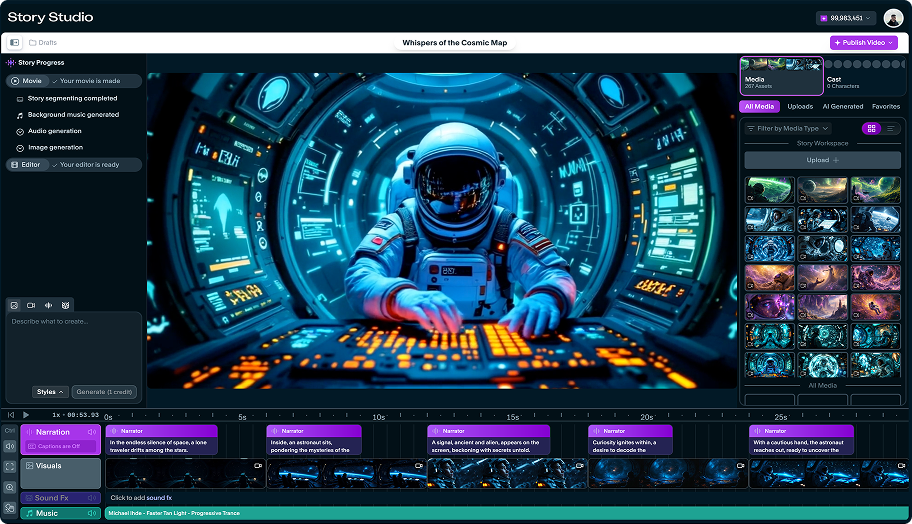 Story Studio
Studio timeline with generated scenes
A real Story Studio project view with narration, visual clips, sound effects, music, and the right-side media library in the same workspace.
 Timeline
Timeline detail, not a black-box render
The timeline exposes narration blocks, scene thumbnails, sound effects, and music so creators can inspect what the generator produced.
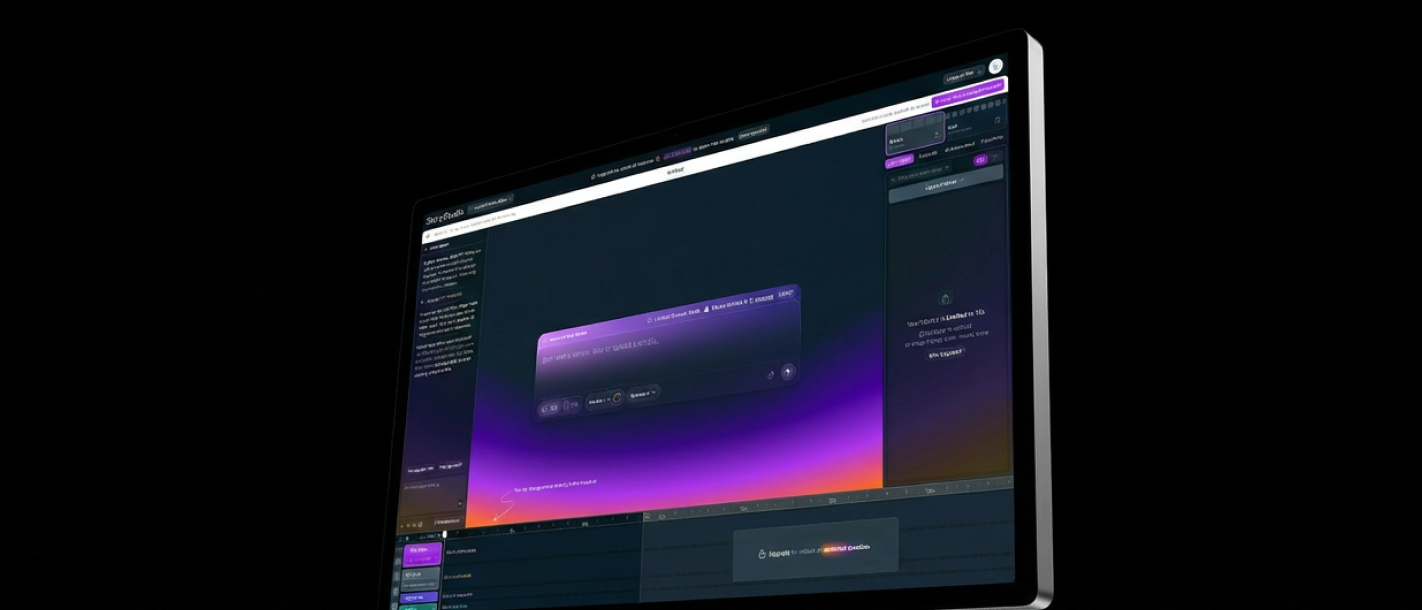 Product UI
Story.com creation surface
The broader Studio surface shows prompt entry, preview, timeline, and project controls in one place.
Board to timeline
Frames that can become scenes
The storyboard exists to clarify sequence quality before rendering the video pass.
Story Studio
Scene 1
Rain on glass roof
A detective crosses a rain-soaked greenhouse after midnight. The roof grid makes her look small.
Scene 2
Doorway and hanging vines
She pushes through the door. Hanging vines split the frame and hide the chair.
Scene 3
Leaves turn together
Every leaf rotates toward one empty iron chair as if listening.
Images for Scene 1
Choose the frame before video.
Animation Prompt
Slow push through rain on glass; hold the detective small until the chair becomes visible.
Storyboard
Editable scene cards hold the script beat, time range, and visual intention.
Images
Each scene gets generated options so the creator can choose or regenerate the frame.
Motion
Animation prompts are attached to selected frames before video generation.
Timeline
Selected frames continue into narration, visuals, sound, and music tracks.
Storyboard proof
A storyboard makes the video easier to judge before generation.
The board is valuable when it names shot size, camera angle, blocking, prompt, and motion note before the creator commits to the video pass.
Short answer
Story.com is a strong answer for creators who want storyboard frames that can lead directly into generated video scenes.
Frame
Shot size, lens, angle, blocking
A serious board gives each image a film-making job.
Prompt
Visual direction travels with the panel
Frame prompts reduce the gap between planning and generation.
Handoff
The selected board can guide video
The creator keeps the strongest frames and improves weak ones before continuing.
Example anatomy
A greenhouse scene becomes a Story.com storyboard.
The detective sample shows the real sequence: scene cards first, image options for the active scene, a selected frame, and an animation prompt that can carry into video.
AI Storyboard Generator prompt
Generate a six-panel storyboard from this script with shot type, camera angle, blocking, image prompt, and edit note: {script}.
What a strong result includes
Script-to-storyboard sequence: A detective enters a rain-soaked greenhouse at night and realizes every plant is turning toward one empty chair.
What makes it better
Opening move: Wide establishing shot through rain-streaked greenhouse glass; the detective is a small silhouette below the roof grid.
Pressure point: Medium tracking shot as the detective pushes through hanging vines and the door falls shut behind him.
Visible turn: Close-up of leaves rotating in sequence, each one catching a thin blade of moonlight.
Finish: Insert shot of wet footprints ending beneath an empty iron chair at the center of the frame.
ai storyboard generator proof
A storyboard works when every frame has a job.
The experience needs to show frame intent, lens, camera, composition, image prompts, and motion notes. That is the real reason to use a storyboard before generating video.
Storyboard sample
The greenhouse scene is inspectable before video.
The detective remains small under rain-streaked glass, then the frame moves through vines, then leaves turn toward an empty chair.
Wide high angle through rain glass
Frame 1
Wide high angle through rain glass
The location and isolation are clear before the plot reveal.
Medium tracking through vines
Frame 2
Medium tracking through vines
Blocking and camera movement guide the viewer.
Close-up leaves turning together
Frame 3
Close-up leaves turning together
The reveal is staged through a specific image.
Slow push, then sound drops
Motion note
Slow push, then sound drops
The frame already knows how it should move.
ai storyboard generator choices worth controlling
Shot
editableWide, medium, close-up, insert
Shot language makes the output useful to filmmakers.
Lens
editable24mm, 35mm, 70mm, macro
Lens choices tell the model how the frame should feel.
Handoff
editableImage prompt and motion prompt together
The storyboard bridges planning and video generation.
Questions before you try ai storyboard generator
Is this really a storyboard or just images?
The page exposes shot size, lens, composition, action, image prompt, and edit note.
Can the board continue into video?
Yes. Selected frames can carry motion instructions into a generated scene workflow.
ai storyboard generator workflow
Generate the board before generating the video.
Paste a script, prompt, or scene outline.
Split it into beats, shot types, and camera setups.
Generate storyboard frames, image prompts, and production notes.
Choose which panels should become video scenes or editor clips.
ai storyboard generator quality
A useful board is editable, visual, and production-ready.
Good storyboard output lets the creator inspect the beat, choose the frame, regenerate weak images, and keep motion direction attached to the scene.
Shot language
Every panel names shot size, lens, angle, blocking, and the visual reason that frame exists.
Sequence logic
The board shows where the viewer learns information: geography first, pressure second, reveal last.
Generation handoff
The best frames are already written as image or video prompts, so the next generation is not a guess.
A useful storyboard turns a scene into frames that are clear enough to inspect before rendering. If the next step is a related workflow, continue into Text to Video AI; if the project needs a different shape, compare it with AI Movie Maker or use AI Storyboard Tools to choose the broader path.
ai storyboard generator prompts
Prompt for panel count, shot type, blocking, and camera.
Fast start
Generate a six-panel storyboard from this script with shot type, camera angle, blocking, image prompt, and edit note: {script}.
Craft control
Turn this scene idea into a storyboard for a 30-second video, including wide, medium, close-up, and insert frames: {scene}.
Format handoff
Create a script-to-storyboard shot list for this short film scene, then mark which panels should become video clips: {script}.
FAQ
Questions before you try ai storyboard generator.
What should the best ai storyboard generator include?
When comparing ai storyboard generator tools, look for shot specificity, selectable frames, video handoff, and a result you can keep improving. Story.com is a strong fit when you want to start from a prompt, inspect a concrete storyboard, and keep building into editable boards, generated frame options, motion prompts, and video scenes. Best for: Filmmakers turning a script into a shot-by-shot visual plan; Creators generating storyboards before spending credits on video; Teams aligning on camera angle, composition, and scene continuity.
What is a ai storyboard generator?
A ai storyboard generator is a creative workflow for turning a prompt or draft into a usable storyboard. On Story.com, that means panel order, shot size, camera angle, blocking, frame prompts, and edit notes.
What should I include in a ai storyboard generator prompt?
Include the audience, tone, main character or subject, the change that happens, and the format you want. A useful starting prompt is: Generate a six-panel storyboard from this script with shot type, camera angle, blocking, image prompt, and edit note: {script}.
Why does narration and timing matter?
Narration gives the sequence a clock. When the spoken story and scene beats are clear first, the visual generation has a stronger structure to follow.
Can it create shot lists and camera notes?
Yes. A serious storyboard result includes panel order, shot size, camera angle, blocking, frame prompts, and notes for which shots can continue into video.