AI cartoon video generator for expressive character moments.
Cartoon and animation terms need visual examples, character consistency, and clear expectations about style control.
Story.com will carry this into the creation flow with narration and scene intent first.
Video briefs to try
Cartoon brief
ai cartoon video generator
A nervous moon rabbit delivers dreams in paper lanterns, but one lantern keeps floating back.
Animated story beat
A cartoon concept with character, style, and timing.
The result shows cartoon video as a story moment, not only a visual style preset.
Moon rabbit courier
Moon rabbit courier
Soft rounded shapes, oversized ears, anxious little hops.
Lantern route
Lantern route
Dream lanterns float between rooftops under blue moonlight.
Returning lantern
Returning lantern
One lantern refuses every delivery and bumps gently into him.
It is his dream
It is his dream
The payoff turns the gag into a character moment.
Starting brief
Built for real creator jobs.
Kids videos and animated stories.
Social shorts with playful visuals.
Explainers that benefit from simple animated scenes.
Next step
Generate the cartoon short or turn the character into a storybook path.
ai cartoon video generator outcomes
Animate a character beat, not just a style.
Cartoon video creators need style, age fit, expressive characters, and story continuity. The result feels playful without becoming shallow.
An AI cartoon video generator creates animated-style videos from prompts, scripts, or stories. Story.com emphasizes character continuity and story structure.
Kids videos and animated stories.
Social shorts with playful visuals.
Explainers that benefit from simple animated scenes.
ai cartoon video generator fit
Cartoon video needs character behavior, not only style.
The creator wants animation, but the output has to show expressive action, age fit, timing, and story continuity.
Example
Cartoon concept
A tiny train made of breakfast cereal delivers morning courage to children who are nervous about school.
Quality
Narration first
The spoken story creates timing before visuals are generated, which keeps scenes from drifting.
Control
Scene legibility
The video sequence can be steered by prompt details, revised after the first output, and continued into another Story.com format.
Timing
Narration gives the scene a clock
Story.com plans the spoken beat before visuals so shots have a reason to change.
Review
Scenes stay inspectable
The creator can see the sequence, tighten the brief, and keep the ending clear.
Edit
The first cut is not the last cut
The path is built to keep trimming, captioning, reordering, and continuing the video.
Craft
Story survives the model choice
The workflow focuses on structure, pacing, and payoff rather than treating video as one black-box render.
Comparison guide
What should the best ai cartoon video generator include?
Short answer
The best ai cartoon video generator for a serious creator is the one that gives you narration and timing, inspectable scenes, edit path, plus a result you can keep improving. Story.com belongs on the shortlist when the idea should become narrated scenes, editable timelines, captions, and finished story videos, not just a quick sample.
When comparing ai cartoon video generator tools, look for narration and timing, inspectable scenes, edit path, and a result you can keep improving. Story.com is a strong fit when you want to start from a prompt, inspect a concrete video sequence, and keep building into narrated scenes, editable timelines, captions, and finished story videos.
Where Story.com fits
Choose Story.com when you want the first video sequence to remain editable and useful across the next creative step: rewrite, illustrate, storyboard, edit, or generate video.
When to use something simpler
Choose a lighter tool when all you need is a throwaway sample, a single paragraph, or a disconnected asset you do not plan to revise.
Best for: Kids videos and animated stories; Social shorts with playful visuals; Explainers that benefit from simple animated scenes.
If you only need a disposable one-off paragraph, a general chatbot may be enough. Choose Story.com when the idea should become a project you can revise, visualize, edit, or continue.
How to compare ai cartoon video generator tools.
Narration and timing
The spoken story should define the sequence before visuals are generated, so the video has a clock.
Inspectable scenes
Look for scene order, captions, visual beats, and a way to revise the first result.
Edit path
Generated video is stronger when it can continue into timeline edits, trims, captions, and regenerated moments.
Customer validation
Cartoon videos work best when story leads style.
Story.com connects kid-friendly story structure, image style, narration, and video timing in one creation flow.
Trusted by teams and creators


1M+
Story.com users
More than 1 million users have used Story.com to turn ideas into stories, books, videos, and visual plans.
Narration
before visuals
Story.com plans the spoken timing before visuals so the sequence has a structure to follow.
Credits
pay per use
Story.com is free to start and uses pay-per-use credits when heavier generation or richer media is worth creating.
What the first result makes concrete
A restless robot learns to dance by misreading street signs.
The robot mistakes arrows for choreography, bumps into a parade, and discovers the city has been trying to teach it rhythm all day.
Character
Square robot, glowing knees, sticker eyes
Specific design details support continuity.
Style
2D, 3D, storybook, playful, cinematic
Style follows character and audience.
Audience
Kids, family, social, explainer
Age fit changes humor and pacing.
ai cartoon video generator example
A character-driven animated moment.
Story.com Studio
Animated story beat
Cartoon brief
ai cartoon video generator
Creator brief
A nervous moon rabbit delivers dreams in paper lanterns, but one lantern keeps floating back.
Character design supports emotion.
Gag is tied to the story choice.
Style notes are animation-friendly.
Narration-first sequence
A cartoon concept with character, style, and timing.
The result shows cartoon video as a story moment, not only a visual style preset.
0:00
Moon rabbit courier
0:06
Lantern route
0:12
Returning lantern
0:18
It is his dream
Character
Moon rabbit courier
Soft rounded shapes, oversized ears, anxious little hops.
World
Lantern route
Dream lanterns float between rooftops under blue moonlight.
Gag
Returning lantern
One lantern refuses every delivery and bumps gently into him.
Emotion
It is his dream
The payoff turns the gag into a character moment.
Continue from here
Generate the cartoon short or turn the character into a storybook path.
Moon rabbit courier
Character
Moon rabbit courier
Soft rounded shapes, oversized ears, anxious little hops.
Lantern route
World
Lantern route
Dream lanterns float between rooftops under blue moonlight.
Returning lantern
Gag
Returning lantern
One lantern refuses every delivery and bumps gently into him.
It is his dream
Emotion
It is his dream
The payoff turns the gag into a character moment.
Real Story.com media
What a ai cartoon video generator result can connect to inside Story.com.
These are Story.com product screenshots and sample assets from the creation system. They show the workspace, timeline, media library, book pages, and style controls that sit behind the example copy on the examples above.
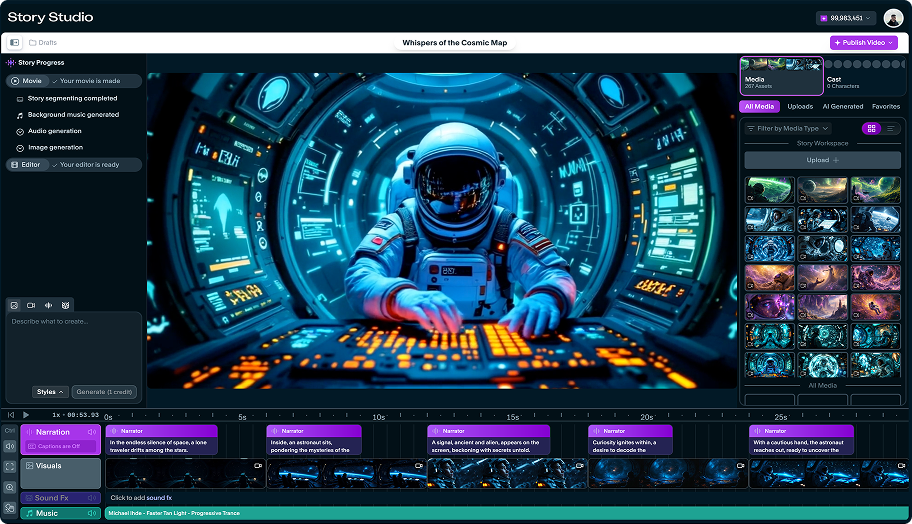 Story Studio
Studio timeline with generated scenes
A real Story Studio project view with narration, visual clips, sound effects, music, and the right-side media library in the same workspace.
 Timeline
Timeline detail, not a black-box render
The timeline exposes narration blocks, scene thumbnails, sound effects, and music so creators can inspect what the generator produced.
 Style
StyleCartoon-native visual direction
Cartoon video pages need expressive style controls tied to the character beat, not a generic animation label.
Video workspace
A narrated sequence with editable scenes
The proof shows timing, scene beats, captions, and revision choices before final output.
Story.com Studio
Animated story beat
Narration-first sequence
A cartoon concept with character, style, and timing.
The result shows cartoon video as a story moment, not only a visual style preset.
0:00
Moon rabbit courier
0:06
Lantern route
0:12
Returning lantern
0:18
It is his dream
Character
Moon rabbit courier
Soft rounded shapes, oversized ears, anxious little hops.
World
Lantern route
Dream lanterns float between rooftops under blue moonlight.
Gag
Returning lantern
One lantern refuses every delivery and bumps gently into him.
Emotion
It is his dream
The payoff turns the gag into a character moment.
Video proof
AI Cartoon Video Generator: The video starts as a timed sequence, not an isolated clip.
Video quality improves when narration, scene order, captions, and visual beats can be inspected before the creator keeps spending effort. The robot mistakes arrows for choreography, bumps into a parade, and discovers the city has been trying to teach it rhythm all day.
Short answer
Story.com is a strong answer when the goal is a story-first AI video with editable sequence logic.
Character
Square robot, glowing knees, sticker eyes
Specific design details support continuity.
Gag
Turn left becomes a dance move
The comedy is visual and repeatable.
Emotion
Embarrassment turns into delight
The cartoon beat has a character change.
Example anatomy
A moon rabbit gives the cartoon a reason to move.
The lantern sample works because the visual style, character emotion, and comic timing all serve one beat.
AI Cartoon Video Generator prompt
Create a cartoon video for kids about {lesson}, with warm narration and bright scenes.
What a strong result includes
Cartoon concept: A tiny train made of breakfast cereal delivers morning courage to children who are nervous about school.
What makes it better
Opening move: Bright opening kitchen scene.
Pressure point: Character boards cereal train.
Visible turn: Soft conflict: first-day worry.
Finish: Ending: courage arrives before the bell.
ai cartoon video generator proof
Cartoon video quality starts with character behavior.
The result should show expressive design, clear action, age fit, and continuity. A cartoon generator experience cannot rely on style alone.
Cartoon sample
A restless robot learns to dance by misreading street signs.
The robot mistakes arrows for choreography, bumps into a parade, and discovers the city has been trying to teach it rhythm all day.
Square robot, glowing knees, sticker eyes
Character
Square robot, glowing knees, sticker eyes
Specific design details support continuity.
Turn left becomes a dance move
Gag
Turn left becomes a dance move
The comedy is visual and repeatable.
Embarrassment turns into delight
Emotion
Embarrassment turns into delight
The cartoon beat has a character change.
Crosswalk, parade, final spin
Scene
Crosswalk, parade, final spin
The sequence has action, not just a style prompt.
ai cartoon video generator choices worth controlling
Style
editable2D, 3D, storybook, playful, cinematic
Style follows character and audience.
Expression
editableFace, pose, movement, reaction
Cartoon emotion has to be visible.
Audience
editableKids, family, social, explainer
Age fit changes humor and pacing.
Questions before you try ai cartoon video generator
Will the character stay consistent?
The prompt asks for repeatable design details, props, and movement traits.
Is it only a cartoon style filter?
No. The example centers action, gag, emotion, and sequence structure.
ai cartoon video generator workflow
Keep the cartoon style tied to a choice.
Choose cartoon style and audience.
Write the story or script.
Generate narration and animated scene beats.
Edit captions, pacing, and final video.
ai cartoon video generator quality
The style has to support the story.
Good cartoon output keeps characters recognizable, actions readable, and the emotional beat clear enough for children or social viewers.
Narration first
The spoken story creates timing before visuals are generated, which keeps scenes from drifting.
Scene legibility
A viewer can tell where they are, what changed, and why the next shot follows.
Editable finish
The result has enough structure to trim, caption, reorder, or continue without starting over.
A good video path starts before the final render, with story shape, pacing, and scenes lined up. If the next step is a related workflow, continue into Bedtime Story Generator; if the project needs a different shape, compare it with AI Storybook Creator or use AI Video Tools to choose the broader path.
ai cartoon video generator prompts
Prompt for character shape, world, gag, and emotion.
Fast start
Create a cartoon video for kids about {lesson}, with warm narration and bright scenes.
Craft control
Turn this story into an animated short with consistent character notes: {story}.
Format handoff
Generate a cartoon explainer video about {topic} for age {age}.
FAQ
Questions before you try ai cartoon video generator.
What should the best ai cartoon video generator include?
When comparing ai cartoon video generator tools, look for narration and timing, inspectable scenes, edit path, and a result you can keep improving. Story.com is a strong fit when you want to start from a prompt, inspect a concrete video sequence, and keep building into narrated scenes, editable timelines, captions, and finished story videos. Best for: Kids videos and animated stories; Social shorts with playful visuals; Explainers that benefit from simple animated scenes.
What is a ai cartoon video generator?
A ai cartoon video generator is a creative workflow for turning a prompt or draft into a usable video sequence. On Story.com, that means narration, scene timing, visual beats, captions, and a route into editing.
What should I include in a ai cartoon video generator prompt?
Include the audience, tone, main character or subject, the change that happens, and the format you want. A useful starting prompt is: Create a cartoon video for kids about {lesson}, with warm narration and bright scenes.
Why does narration and timing matter?
Narration gives the sequence a clock. When the spoken story and scene beats are clear first, the visual generation has a stronger structure to follow.
Can I edit the video after it is generated?
Yes. Start with narration and scene timing, then review the generated sequence so captions, pacing, and the ending can be tightened.